COTBridge lane editor
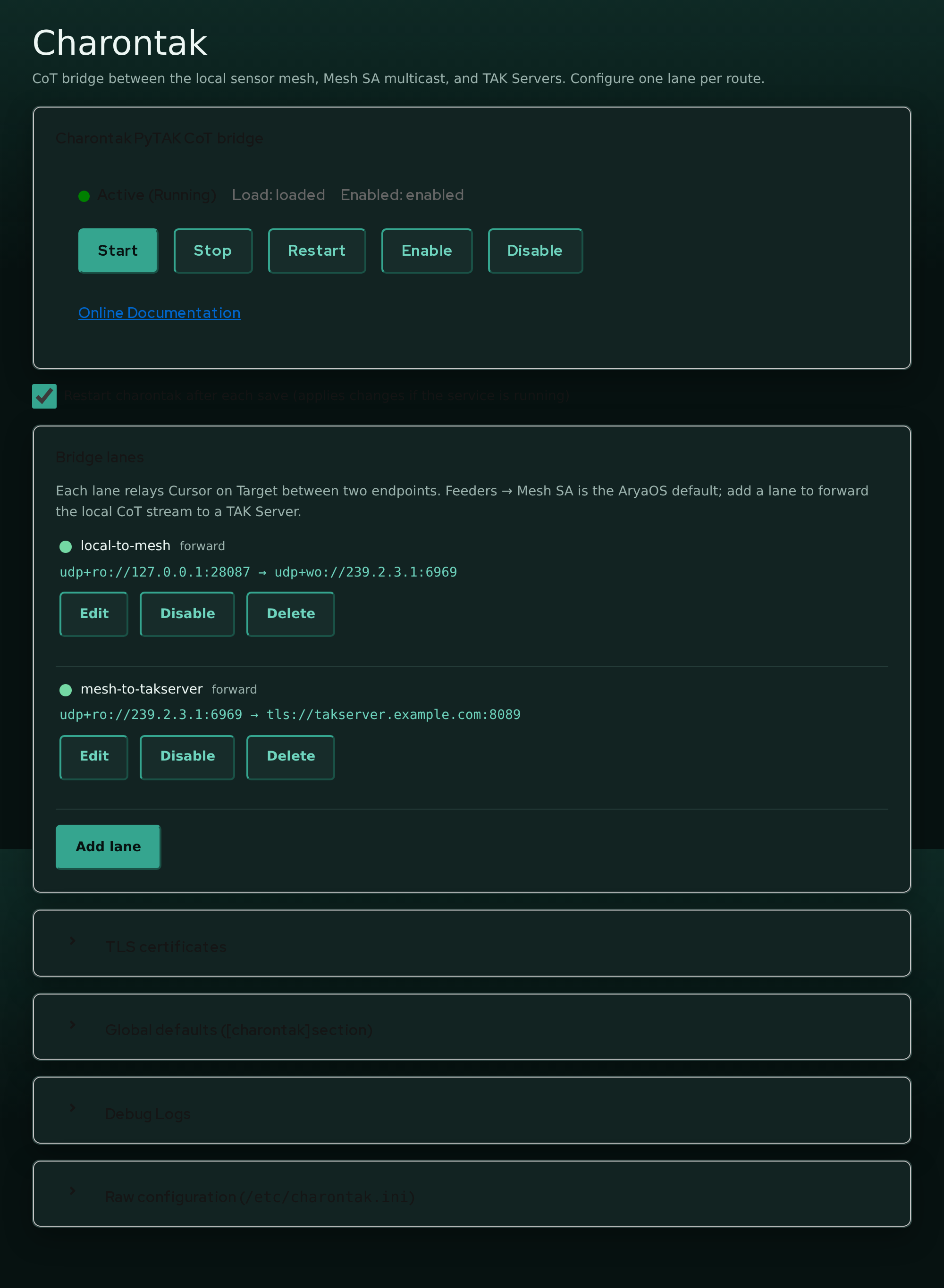
COTBridge is the CoT hub at the center of AryaOS. Every local sensor gateway sends its Cursor on Target (CoT) to COTBridge. COTBridge sends that stream to Mesh SA, TAK Servers, or other tools. The COTBridge Cockpit plugin edits /etc/cotbridge.ini through a structured lane editor so you rarely have to touch the INI by hand.
Open it from Cockpit > COTBridge.
Concept: one hub, many lanes
AryaOS routes CoT in two tiers:
flowchart LR
  subgraph feeders[Local feeders]
    a[adsbcot]
    b[aiscot]
    c[dronecot]
    d[lincot / gpscot / ...]
  end
  feeders -->|udp+wo://127.0.0.1:28087| hub[(COTBridge hub)]
  hub -->|lane: site-output| out[Primary site destination<br/>Mesh SA or TAK Server]
hub -.->|extra lane| tool[Recorder / sidecar]- Feeders publish to the hub's ingress at
udp+wo://127.0.0.1:28087. - COTBridge listens on that address and owns egress.
- Each lane is a
[lane:*]section in/etc/cotbridge.inithat relays CoT between two endpoints.
The image ships one operator-facing lane:
| Lane | Default state | Flow |
|---|---|---|
site-output |
enabled | udp+ro://127.0.0.1:28087 > the site-wide output URL. Mesh SA by default |
Change the primary destination from Cockpit > AryaOS Site > TAK destination.
Use this lane editor only when an advanced deployment needs extra destinations,
nonstandard ingress, or per-lane overrides. Upgrades disable the retired
local-to-mesh, local-to-takserver, and mesh-to-takserver sections so old
configuration cannot duplicate events.
COTBridge needs at least one lane
If no lanes are configured, COTBridge exits at startup. The editor warns you when the lane list is empty.
The lane list
The Bridge lanes card lists each lane with its status, name, mode, and flow. Each lane has Edit, Enable / Disable, and Delete buttons.
- Enable / Disable flips the lane's
enabledflag and saves immediately. - Delete removes the lane's section from the file (with a confirmation).
Adding or editing a lane opens the lane editor form.
Adding or editing a lane
Press Add lane (or Edit on an existing lane) to open the editor.
| Field | INI key | Notes |
|---|---|---|
| Lane name | (section name) | New lanes only. Lowercase letters, digits, ., -, _. Must be unique |
| Enabled | enabled |
Whether the lane runs |
| Mode | mode |
forward, reverse, or duplex (see below) |
| Ingress CoT URL | ingress_cot_url |
Local side |
| Egress CoT URL | egress_cot_url |
Remote side |
| Suppress hello event | PYTAK_NO_HELLO |
Recommended true for bridges |
| TAK protocol | TAK_PROTO |
Payload framing. inherited unless set |
| TLS fields | PYTAK_TLS_* |
Appear when a TLS scheme is used (below) |
A new lane pre-fills the ingress with the AryaOS hub address udp+ro://127.0.0.1:28087 and enables Suppress hello event - the sensible defaults for a bridge.
Ingress vs egress
- Ingress is the local side: where the lane reads CoT from. On AryaOS that is normally the hub,
udp+ro://127.0.0.1:28087, where feeders publish. - Egress is the remote side: where the lane writes CoT to. Mesh SA (
udp+wo://239.2.3.1:6969) or a TAK Server (tls://host:8089). Import a one-timetak://enrollment URL from the AryaOS Site page. It resolves that URL to a persistent TLS destination and certificate set.
Both are required. Empty keys are removed so the lane falls back to the [cotbridge] global defaults.
Modes
The Mode selector controls which direction CoT flows between the two URLs:
| Mode | Direction | Flow shown |
|---|---|---|
forward |
ingress > egress | ingress > egress |
reverse |
egress > ingress | egress > ingress |
duplex |
both directions | ingress ⇄ egress |
Most AryaOS lanes are forward: read from the local hub, write to the remote destination.
Suppress hello event (PYTAK_NO_HELLO)
Enable this on bridge lanes so COTBridge does not inject its own presence "hello" event into the stream. It is on by default for new lanes and for the shipped lane.
TAK protocol (TAK_PROTO)
Sets the payload framing for the lane. Leave as inherited / default unless the peer requires a specific value:
0- XML1- Mesh protobuf2- Stream protobuf
Set lane defaults in the collapsible Global defaults ([cotbridge] section) card. It contains
DEBUG, CONNECT_RETRY_SLEEP, MAX_IN_QUEUE, and MAX_OUT_QUEUE. Each lane inherits these values
unless it defines an override.
Per-lane TLS
When a URL uses a TLS scheme, the editor shows a TLS client identity fieldset:
| Field | INI key |
|---|---|
| Client certificate | PYTAK_TLS_CLIENT_CERT |
| Client key | PYTAK_TLS_CLIENT_KEY |
| CA bundle | PYTAK_TLS_CLIENT_CAFILE |
| Key password | PYTAK_TLS_CLIENT_PASSWORD |
| Skip certificate verification | PYTAK_TLS_DONT_VERIFY |
| Skip hostname check | PYTAK_TLS_DONT_CHECK_HOSTNAME |
These are per-lane, so one COTBridge instance can hold different client identities for different TAK Servers. The paths point at PEM files on the device (for example /etc/cotbridge/tls/client.crt).
Verification switches are testing only
PYTAK_TLS_DONT_VERIFY and PYTAK_TLS_DONT_CHECK_HOSTNAME disable TLS safety checks. Never leave them enabled in the field.
Let the AryaOS Site page do it
You usually do not fill the TLS fields by hand. The TAK connection card imports a package or enrollment URL. It then configures the site-output lane and its certificates.
Validation
The editor uses the same validation rules that COTBridge uses at startup. It rejects the same invalid values before you save them.
Supported CoT URL schemes
The ingress and egress URLs must use a scheme PyTAK understands:
| Scheme | Use |
|---|---|
tcp:// |
Outbound TCP client (e.g. tcp://host:8087) |
udp://, udp+wo://, udp+ro://, udp+broadcast:// |
UDP - write-only (+wo), read-only listen (+ro), or broadcast |
tls://, ssl://, tak:// |
TLS / TAK Server / enrollment |
log://, file:// |
Logging / file output |
An unsupported scheme is rejected with a message pointing at the PyTAK configuration docs. Note in particular:
No TCP listen
PyTAK does not support inbound tcp+...:// listen schemes. Only outbound tcp:// (client). If you need local feeders to reach a listener, point them at a udp+ro:// mesh instead.
Loopback UDP must be directional
A bidirectional udp:// on loopback is ambiguous. To listen for local CoT senders on a loopback port, use udp+ro://127.0.0.1:<port> (or udp+ro://:<port>). The editor flags a bare udp://127.0.0.1:<port> and tells you the fix. A bare all-interfaces udp://:<port> is auto-normalized to udp+ro://.
UDP bind-conflict checks
Two enabled lanes cannot both bind the same UDP endpoint (host + port). When you save, the editor computes the bind endpoints of every enabled lane. It checks the ingress and egress endpoints. The editor rejects collisions and names both lanes. Give each lane a distinct UDP ingress/egress bind, or disable the extra lane.
Raw INI escape hatch
For anything the structured editor does not manage, the Raw configuration card exposes /etc/cotbridge.ini for direct editing. The lane editor only touches the keys it owns and preserves everything else. Thus, you can mix structured edits with hand-written keys. After a raw save, COTBridge restarts to pick up the change.
After you save
Saving through the plugin restarts cotbridge for you. If you edit the INI over SSH instead, restart it manually:
See also
- Connect to a TAK Server - end-to-end TAK Server setup
- Relay & routing - routing patterns and courses of action
- Site configuration - the feeder-side
COT_URL - AryaOS Site page - one-click TAK connection