Gateway pages
Each AryaOS gateway appears in Cockpit's left menu. A dedicated page edits one service and shows its logs.
Some optional gateways use a smaller management page. That page provides service controls, health, configuration paths, and logs.
Open any gateway page from Cockpit's left menu.
Which plugin manages which service
| Cockpit plugin | Service | Config file | Feeds |
|---|---|---|---|
| adsbcot | adsbcot |
/etc/default/adsbcot |
ADS-B aircraft > CoT |
| aiscot | aiscot |
/etc/default/aiscot |
AIS vessels > CoT |
| DroneCOT DJI / AntSDR | dronecot-dji |
/etc/default/dronecot-dji |
DJI DroneID > CoT |
| DroneCOT DroneScout | dronecot-dronescout |
/etc/default/dronecot-dronescout |
Open Drone ID > CoT |
| DroneCOT Wi-Fi Remote ID | dronecot-wifi |
/etc/default/dronecot-wifi |
Wi-Fi Remote ID > CoT |
| DroneCOT Bluetooth Remote ID | dronecot-ble |
/etc/default/dronecot-ble |
Bluetooth Remote ID > CoT |
| ACARS | acarscot |
/etc/default/acarscot |
ACARS > CoT |
| GDL90 | gdlcot |
/etc/default/gdlcot |
CoT > EFB traffic |
| SiK telemetry | sikw00fcot |
/etc/default/sikw00fcot |
MAVLink > CoT |
| GutCheck | gutcheck |
/etc/default/gutcheck |
Tactical discovery and health |
| aprscot | aprscot |
/etc/default/aprscot |
APRS (KISS TNC / APRS-IS) > CoT |
| sapientcot | sapientcot |
/etc/default/sapientcot |
SAPIENT (BSI Flex 335) C-UAS / ISR > CoT |
| lincot | lincot |
/etc/default/lincot |
This host's position/beacon > CoT |
| gps | (gpsd) | - | On-board GNSS receiver |
| gpscot | gpscot |
/etc/default/gpscot |
Network GPS to ATAK/WinTAK |
| aiscatcher | ais-catcher |
/etc/default/ais-catcher |
Over-the-air AIS receiver |
The AIS receiver (ais-catcher) demodulates RF AIS and hands messages to aiscot. aiscot is the CoT feeder. Likewise readsb/dump1090-fa/dump978-fa decode ADS-B/UAT and adsbcot feeds the CoT.
The common layout
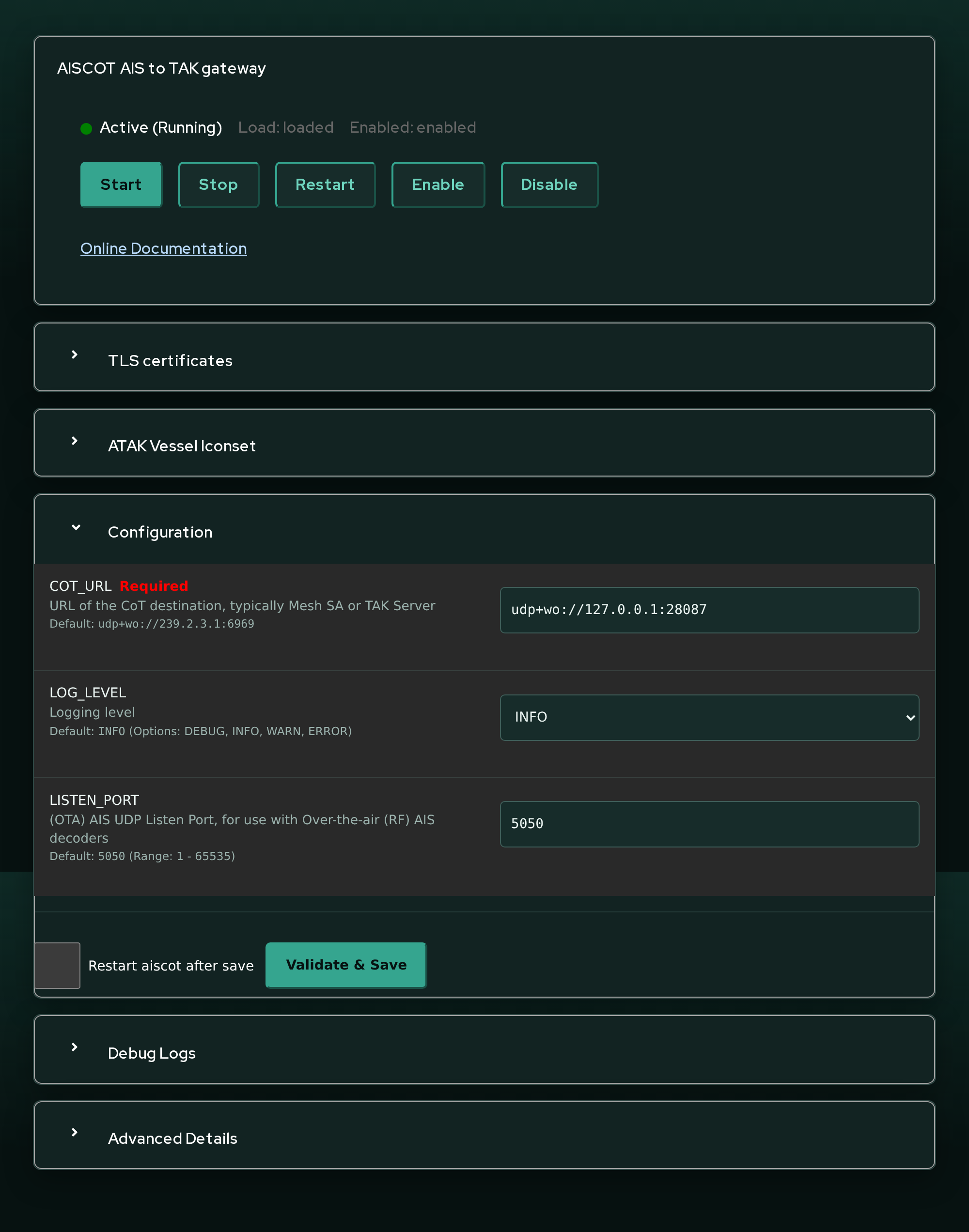
Every gateway plugin (using aiscot as the representative example) shows the same cards, top to bottom:
Service card
At the top, a service management card shows the service's current state and gives you start / stop / restart / enable controls. Enabling a service makes it start at boot. The device role also manages enable/disable across the whole sensor set.
TLS card
A TLS upload card installs PEM client credentials for this service. For aiscot they go under /etc/aiscot/tls. The plugin fills in the matching PYTAK_TLS_CLIENT_CERT / PYTAK_TLS_CLIENT_KEY / PYTAK_TLS_CLIENT_CAFILE config keys.
Prefer site-wide TLS
In most deployments you install one set of certs once, on the AryaOS Site page. Every gateway inherits it. Use the per-gateway TLS card only when a single service needs a different client identity from the rest.
Configuration card
The Configuration card is a form generated from the gateway's environment-variable definitions. Each row shows the variable name, description, default, and an input for its type. Required fields are marked. Values are validated as you type. For example, COT_URL must use a supported scheme. Ports and enumerated values must also be valid. Invalid fields block the save.
Tick Restart service after save and press Validate & Save to write /etc/default/<svc> and (optionally) restart the service.
A representative slice of the aiscot form:
| Variable | Type | Default | Purpose |
|---|---|---|---|
COT_URL |
url | udp+wo://239.2.3.1:6969 |
CoT destination for this feeder |
LOG_LEVEL |
enum | INFO |
DEBUG / INFO / WARN / ERROR |
LISTEN_PORT |
number | 5050 |
UDP port for over-the-air AIS input |
FEED_URL |
url | (empty) | Online AIS aggregator feed |
IGNORE_ATON |
boolean | false |
Drop Aids-to-Navigation |
UNDERWAY_ONLY |
boolean | false |
Drop anchored/moored vessels |
COT_STALE |
number | 3600 |
CoT stale timeout (seconds) |
Dedicated gateway pages expose their own variables. ACARS, GDL90, SiK, and GutCheck use smaller management pages.
Debug / logs card
A Debug Logs card shows live systemctl status output and gives you Show Logs, Follow Logs, and Stop Following buttons that stream the service's journal (journalctl -u <svc>).
The gateway page itself is the scroll container. Expanding Debug Logs or Advanced Details therefore remains scrollable inside Cockpit even when the card extends below the initial viewport. This behavior is covered by package and browser regressions across all seven gateway plugins listed above.
If one gateway suddenly appears unstyled while the others retain the AryaOS
palette, first hard-refresh the page to discard cached HTML and CSS. Current
packages also verify that every gateway HTML file explicitly loads both its
bundled index.css and Cockpit's shared AryaOS branding stylesheet.
Advanced card
An Advanced Details card shows the raw contents of the service's /etc/default/<svc> file for reference.
Inheritance: site config, then per-service override
This is the key to how AryaOS gateways are configured:
- Every gateway's systemd unit reads
/etc/aryaos/aryaos-config.txt(the site config) viaEnvironmentFile=first. - Then it reads its own
/etc/default/<svc>file.
Because the per-service file is read second, anything you set on a gateway page overrides the site default for that one service. Anything you leave unset falls through to the site value.
How the default CoT route works
The site config sets COT_URL=udp+wo://127.0.0.1:28087 (the COTBridge hub). Each gateway inherits that value. Thus, every feeder sends CoT to COTBridge without a gateway-specific COT_URL. Setting COT_URL on the aiscot page changes only aiscot. The other gateways keep using the hub.
This is why the CoT routing invariant holds without per-service configuration. feeders > cotbridge > Mesh SA / TAK Server. Leave each feeder's COT_URL unset (inheriting the hub) and control the upstream in the COTBridge lane editor.
Setting COT_URL per gateway bypasses COTBridge
Overriding COT_URL on a gateway page routes that feeder around the hub. That is occasionally useful for debugging. But it means the feeder no longer benefits from COTBridge's fan-out to Mesh SA and TAK Servers. Prefer configuring destinations as COTBridge lanes.
See also
- Configuration model - the full inheritance picture
- Site configuration - the keys every gateway inherits
- COTBridge lane editor - where upstream destinations live
- Software suite - every gateway and what it does