Drones (Counter-UAS)
Detect and track drones for counter-UAS (C-UAS) awareness. Select the cuas role, attach a Remote ID receiver and/or a DJI DroneID SDR. Drones appear in ATAK/WinTAK/iTAK as native Cursor on Target (CoT) tracks - often complete with the operator's location.
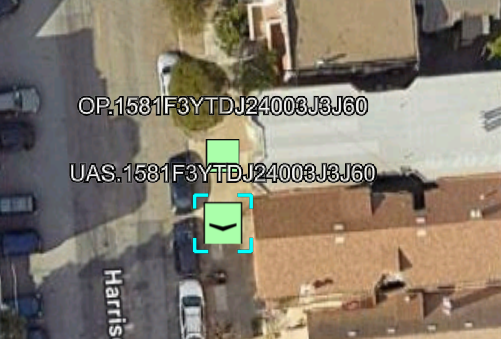
AryaOS builds a C-UAS picture from two complementary detection sources:
- Remote ID / Open Drone ID - decoded by the explicit
dronecot-wifi,dronecot-ble, ordronecot-dronescoutinstances. - DJI DroneID - DJI's proprietary telemetry, received over the air with an SDR (for example an AntSDR) and decoded by DJICOT.
sikw00fcot additionally converts SiK-radio MAVLink drone telemetry to CoT when you have that link.
Dedicated Remote ID receiver: DroneScout DS110
A BlueMark DroneScout DS110 / DroneBeacon - a standards-based Remote ID receiver. Plugs in over USB serial and emits detected Remote ID as MAVLink (OPEN_DRONE_ID_MESSAGE_PACK or ADSB_VEHICLE). Depending on the receiver or cable it can appear as USB CDC or a generic USB-UART bridge. Run sudo aryaos-role discover --apply. AryaOS requires checksum-valid Remote-ID MAVLink before selecting the stable /dev/serial/by-id/... path for dronecot-dronescout. A missing receiver cleanly skips the service instead of restart-looping. The dedicated instance also reverses the LF-to-CRLF expansion seen in some ESP USB firmware before pymavlink validates the frames. It runs alongside the AntSDR/DJI source for a multi-source Remote ID picture. (The ESP32-S3 path is live-verified against a DroneScout DS110.)
Wi-Fi Remote ID: monitor-mode adapter
dronecot decodes Open Drone ID directly off the air over Wi-Fi (ASTM F3411 Beacon vendor IE and Wi-Fi Alliance NAN) using a monitor-mode USB adapter. An Atheros AR9271 (ath9k_htc) or Realtek 8821CU works well. AryaOS ships an opt-in instance, dronecot-wifi (FEED_URL=wifi://wlan1, channel-hopping ⅙/11). Enable it on a box with an external adapter. sudo systemctl enable --now dronecot-wifi. Use wireless://wlan1 to run Wi-Fi + BLE together. (Live-verified 2026-07-24. An AR9271 decoded a BlueMark DroneBeacon Wi-Fi squawk. The same aircraft the DS110 decoded over serial.) wlan0 is the on-board AP radio - always use the external adapter.
Default standalone setup
Power the device and connect a TAK EUD (ATAK, WinTAK, or iTAK) to its Wi-Fi hotspot. Drone tracks require no additional configuration. Reboot the gateway if the receiver was attached after startup.
Turn on the C-UAS role
Three CONOP modes
An AirTAK C-UAS can run in one of three connectivity modes:
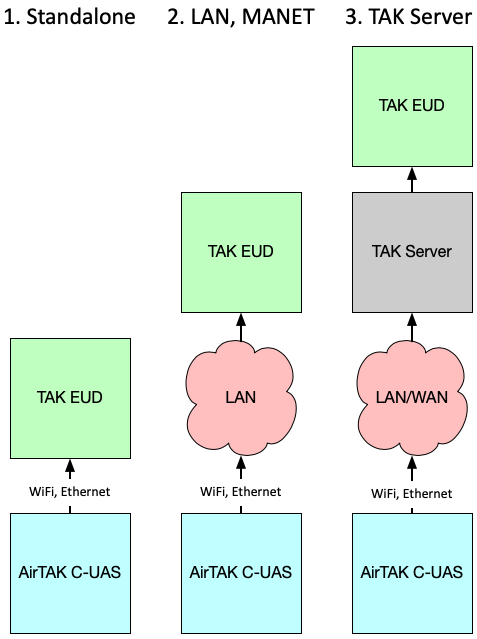
- Standalone. One or more EUDs connect directly to the AirTAK Wi-Fi hotspot or Ethernet. This is the default, off-the-shelf configuration and needs no extra setup.
- LAN / MANET. AirTAK's Wi-Fi or Ethernet connects to an existing LAN or MANET, extending coverage across the team.
- TAK Server. AirTAK connects to a network and forwards CoT to a TAK Server.
Standalone using Wi-Fi
- Connect USB power. On kitted units, match the color-coded connectors (yellow to yellow, black to black).
- After about two minutes, a Wi-Fi network named
AryaOS-XXXXappears. Join it. - Open ATAK, WinTAK, or iTAK - drone tracks arrive over Mesh SA automatically.
Joining an existing network
To use your own Wi-Fi or Ethernet, follow the onboarding steps. Then open the console through mDNS or the device's DHCP address.
How it flows
flowchart LR
    RID[Remote ID<br/>Wi-Fi / BT] --> DC[dronecot]
    DJI[DJI DroneID<br/>AntSDR / SDR] --> DJICOT[DJICOT]
    MAV[SiK MAVLink] --> SK[sikw00fcot]
    DC & DJICOT & SK -->|CoT| H[COTBridge hub]
    H -->|Mesh SA 239.2.3.1:6969| E[ATAK / WinTAK / iTAK]
Each detector emits CoT to the COTBridge hub at udp+wo://127.0.0.1:28087.
COTBridge sends the unified stream through the site-wide output to Mesh SA or
a TAK Server.
Manage the AntSDR
An AntSDR E200 running the alphafox02 DJI DroneID firmware detects DJI OcuSync DroneID and pushes it to dronecot-dji over point-to-point Ethernet (TCP 172.31.100.1:52002). That Ethernet link is the data path. The AntSDR's USB-serial is its Zynq config/recovery console, not a data feed.
-
Health status. AryaOS polls the feed every 30 seconds with
aryaos-antsdr-health. Cockpit shows an AntSDR (DJI DroneID) card when an AntSDR is present. Green means both connections work. Amber means a connection is missing.tak_established: falsemeans TAK egress is degraded. The card is hidden when no AntSDR is present. Check it manually with: -
Console access. To configure the SDR (e.g.
fw_setenvto change its IP) or recover a wedged unit without a second computer, open its console from the Pi:On an AntSDR box, pin a stable
/dev/antsdr-consolefirst withsudo touch /etc/aryaos/antsdr-console.enabled && sudo udevadm trigger(the console adapter is a generic CH340, so this symlink is opt-in to avoid clashing with a CH340-based GPS).
Verify tracks
- Connect an EUD to the
AryaOS-XXXXhotspot and open your TAK client. -
On the box:
-
Fly a Remote ID-compliant drone (or a known DJI aircraft) nearby and confirm the track - including, where broadcast, the operator/pilot position.
Remote ID track fields
Remote ID broadcasts typically include the drone's position, altitude, and operator location. You can map both the aircraft and its pilot. DJI DroneID also carries home or operator coordinates.
Connecting an EUD
AirTAK C-UAS is tested with iTAK, WinTAK, and ATAK. By default, local feeders send to COTBridge on
the gateway. COTBridge multicasts CoT to 239.2.3.1:6969. Add TAK Server destinations as COTBridge
lanes. See Connect a TAK Server.
Related
- Multi-sensor - combine drone detection with air and maritime.
- Connect a TAK Server · Offline backpack
- Device roles · Glossary